Add video uploads and playback to your Supabase app
Let your users upload videos and watch them stream smoothly on any device, with every file kept in your own Supabase Storage bucket.
By the Chunkify team


Supabase gives your app a database, sign-in, and file storage. Video needs one more step. A phone recording can be several hundred megabytes in a format some browsers cannot play, and viewers on a slow connection need a smaller version that keeps playing instead of buffering.
Chunkify adds that step to a Supabase app. Your users upload straight to your Supabase bucket, Chunkify prepares each video for streaming in the same bucket, and viewers watch it from Supabase's CDN. You keep the files, the bucket, and the database rows.
What stays in Supabase
| In your Supabase project | Added by Chunkify |
|---|---|
| The bucket that holds the original uploads and the streams | Preparing each upload as an adaptive stream, with a poster and timeline thumbnails |
| Sign-in, so only your users can upload | The browser uploader and the video player |
A videos table with each video's playback links |
Webhooks that tell your app when a video is ready |
| The CDN that delivers the video to viewers | Optional playback analytics: views, watch time, and quality |
Nothing is copied to another service for playback, so there is no second video library to keep in sync with your database.
What you build
- Connect your bucket. Add your Supabase Storage bucket to Chunkify as S3-compatible storage and make it the default for new videos.
- Let signed-in users upload. A Supabase Edge Function checks who is signed in, adds a row to your
videostable, and starts the upload. The uploader sends the file from the browser straight to your bucket, so large videos never pass through your servers. - Save the playback links. When a video can play, Chunkify notifies the same Edge Function, which saves its playback, poster, and thumbnail links on the row.
- Play the video. Your app reads the row and plays the video with Chunkify Player, which picks the right quality for each viewer's connection and shows previews when they scrub the timeline.
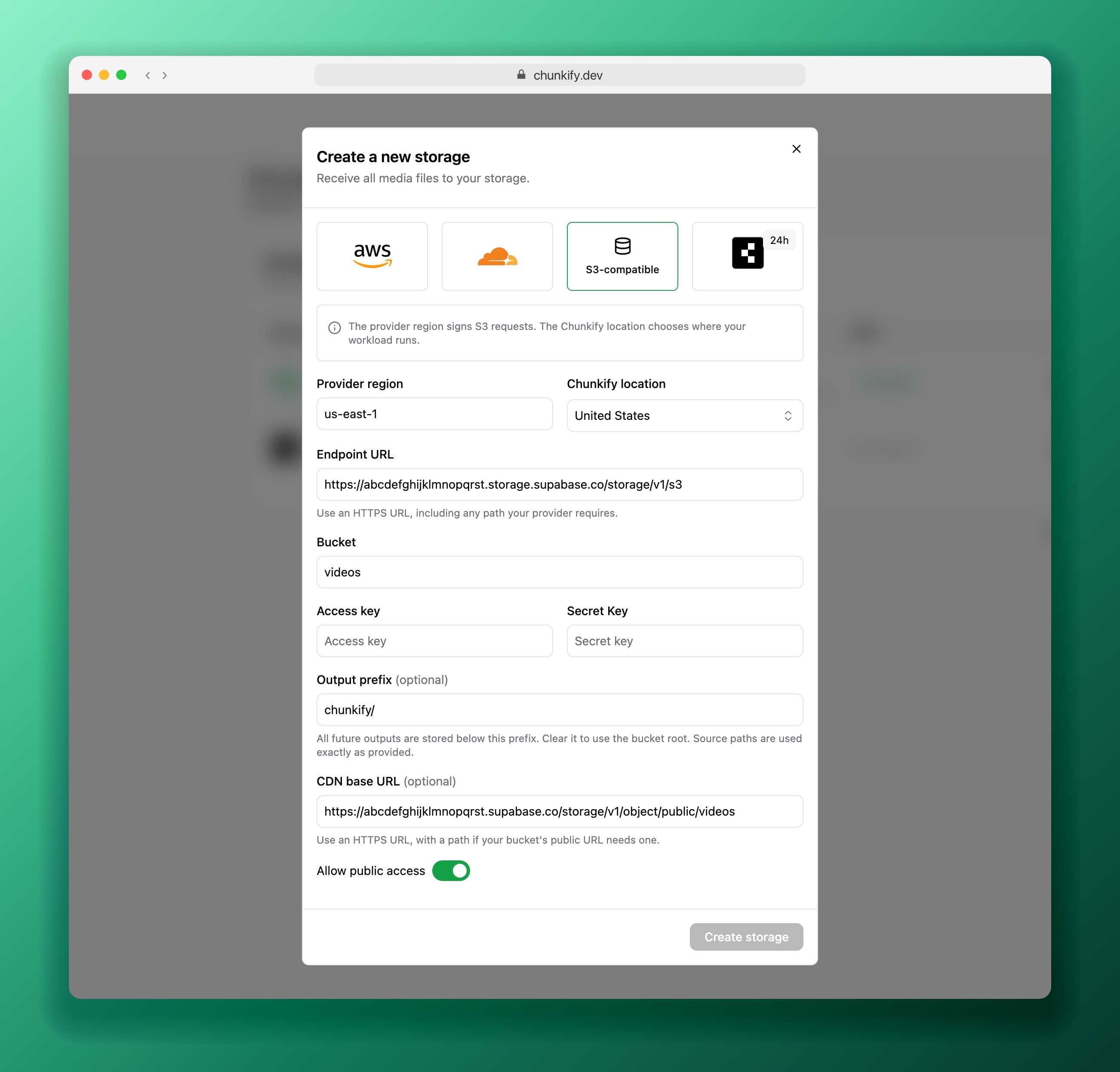
Chunkify recognizes your Supabase endpoint and shows the connection as Supabase Storage. Browser uploads and playback work from any website without extra bucket settings. Because your app stores links to files in your own bucket, it plays videos without calling Chunkify on every view.
To see views, watch time, and playback quality, turn on Chunkify Analytics in the player.
Follow the Supabase integration guide for the full Edge Function, table, and Next.js components.
What it costs
You pay once per video, not per view. Chunkify charges to prepare each video, by its length and resolution: a 10-minute 1080p video costs $0.30 on Pay as you go ($0.20 on Team), and more views don't add to it. Transferring the prepared files to your Supabase bucket is included up to 50 GiB a month on Pay as you go and 100 GiB on Team, then costs $0.09 per GiB. Supabase bills storage and the bandwidth viewers use under your Supabase plan. See pricing for every rate.
Things to plan for
- File size: Supabase limits the size of each uploaded file, and the limit depends on your plan. The Free plan allows 50 MB, which is enough to try the flow but not for most real videos.
- Public bucket: anyone with a link can read files in a public bucket, including the original uploads. Use a separate private bucket for files that must stay private.
- Access keys: the S3 access key you give Chunkify can read and write every bucket in your project. Only Chunkify's servers use it; keep it out of your app.
Frequently asked questions
Do I need Next.js?
No. The Edge Function works with any frontend. The uploader and player are web components with React wrappers, so they also work in plain HTML, Vue, Svelte, or other frameworks.
Can I keep the original uploads private?
Yes. Connect a second, private Supabase bucket in Chunkify and send uploads there by passing its storage ID when you create the upload session. The streams still go to the public bucket set as the Project default.
Does this work with my existing Supabase sign-in?
Yes. The upload route uses the access token that supabase-js already sends, so whoever can sign in to your app can upload. Change the check in the function if only some users should upload.
Next steps
- Follow the Supabase integration guide for the full Edge Function, table, and components.
- Chunkify Uploader covers styling, events, and retries.
- Chunkify Player covers captions, analytics, and player options.
- Add video upload and streaming to a Next.js app shows the same flow without Supabase.