Introducing per-title optimization for transcoding
The Transcoding API can predict video bitrate from the content of each video, so you choose the format and resolution and Chunkify handles rate control.
By the Chunkify team
Match the bitrate to the content
Two videos with the same dimensions can need very different bitrates. A screen recording stays sharp at a fraction of the bitrate a sports clip needs, and a single video can move from a static shot to fast action in a few seconds.
With per-title optimization, you choose the output format and resolution, and Chunkify predicts the video bitrate from the content. It analyzes different parts of the video independently, so a simple section can use less bitrate while a detailed or fast-moving one receives more. The result is still one MP4 or WebM file.
Per-title optimization is available on every plan for these outputs:
| Output | Codecs |
|---|---|
| MP4 | H.264, H.265, AV1 |
| WebM | VP9 |
Enable per-title optimization
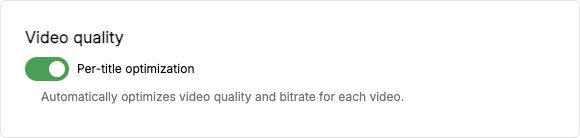
In the app, per-title optimization is on by default when you create a video transcode. Turn it off under Video quality when you need manual CRF or bitrate settings.
With the TypeScript SDK, set format.per_title to true when you create a transcode. This creates a 720p H.264 MP4 in your Project's output storage:
import Chunkify from '@chunkify/chunkify';

const client = new Chunkify({
  projectAccessToken: process.env.CHUNKIFY_TOKEN,
});

const transcoding = await client.transcodings.create({
  source_id: 'src_3A0yDPVjACk8FkYZFnP7Ab5DSDV',
  format: {
    id: 'mp4_h264',
    height: 720,
    per_title: true,
  },
  storage: {
    path: 'exports/optimized-720p.mp4',
  },
});
The API leaves per-title optimization off when the field is omitted or false, so manual configurations keep working.
What you still choose
Per-title optimization selects video rate control. Do not combine it with crf, video_bitrate, minrate, maxrate, or bufsize. You still choose the codec, dimensions, frame rate, encoding preset, compatible pixel format, and audio settings.
If analysis cannot produce a usable prediction for part of a video, that part uses the codec's default CRF. The accepted dimensions, frame rate, trim, and price do not change.
Processing time and price
Content analysis adds work before encoding, so a transcode with per-title optimization can take longer. It is priced at 1.5 times the output rate for the same resolution, codec, and frame rate. The price is accepted when you create the transcode and does not change with the predicted bitrate. See transcoding pricing.
Output size and quality depend on the source. Compare a few representative videos before enabling optimization across a library.
Video assets use it automatically
This setting applies to transcodes you create through the Transcoding API. If you publish video for streaming with Assets, you have nothing to enable: Chunkify analyzes each video and selects its streaming resolutions and bitrates for you, and the preparation price includes it.
Read the per-title optimization guide for examples in every SDK language.